
회원 가입 및 등록하는 form을 css와 JS를 연결해준다.
<!DOCTYPE html>
<html lang="en">
<head>
  <meta charset="UTF-8">
<meta name="viewport" content="width=device-width, initial-scale=1.0">
  <title>IT's 등록화면</title>


</head>
<body>
<div id="container">
<!-- navbar  추가  -->


  <div id="register">
	  <h1>Register</h1>
	  <form action="" method="post">
	  <div class="form-item">
	    <label for="name">이름</label>
	    <input type="text" id="name" name="id">
	 </div>

	   <div class="form-item">
	    <label for="email">이메일</label>
	    <input type="email" id="email" name="email">
	  </div>

	   <div class="form-item">
	    <label for="phone">연락처</label>
	    <input type="text" id="phone" name="phone">
	   </div>

	    <div class="form-item">
		    <label for="password">비밀번호</label>
		    <input type="password" id="password" name="password">
	    </div>

	   <div class="form-item">
		    <label for="password2">비밀번호 확인</label>
		    <input type="password" id="password2" name="password2">
	    </div>

	    <hr>
	    <button>회원 가입</button>
	  </form>

 </div>

  <!--footer영역 -->
<!doctype html>
<html lang="en">
  <head>
    <meta charset="UTF-8" />
    <meta name="viewport" content="width=device-width, initial-scale=1.0" />
    <title>IT's KOSTA - login</title>
    <link rel="stylesheet" href="./css/common.css" />
    <link rel="stylesheet" href="./css/navbar.css" />
    <link rel="stylesheet" href="./css/footer.css" />
  </head>
  <style>

    #login {
      width: 80%;
      max-width: 800px;
      margin: 50px auto;
      padding: 40px;
      border: 1px solid #ddd;
      position: relative;
    }

    #login h1 {
      text-align: center;
      margin-bottom: 30px;
    }

    /* 아이디, 비밀번호 입력 항목 정렬 */
    .form-item {
      margin-bottom: 10px;
      display: flex;
      align-items: center;
    }

    .form-item label {
      width: 80px;
      font-size: 0.9rem;
    }

    .form-item input {
      width: 200px;
      padding: 3px;
      border: 1px solid #ccc;
    }


    hr {
      border: 0;
      border-top: 1px solid #eee;
      margin: 20px 0;
    }


    #login button {
      position: absolute;
      right: 40px;
      bottom: 25px;
      padding: 5px 15px;
      background-color: #f8f8f8;
      border: 1px solid #bbb;
      cursor: pointer;
    }

    #login button:hover {
      background-color: #eee;
    }
  </style>
  <body>
    <div id="container">
      <!-- navbar  추가 -->
      <nav id="navbar">
        <!-- 5개의 메뉴생성 -->
        <ul class="nav-links">
          <li class="nav-item logo">
            <a href="index.html"
              ><img src="./images/logo.jpg" alt="로고입니다."
            /></a>
          </li>
          <li class="nav-item"><a href="personal.html">개인</a></li>
          <li class="nav-item"><a href="busines.html">기업</a></li>
          <li class="nav-item"><a href="login.html">로그인</a></li>
          <li class="nav-item"><a href="register.html">회원가입</a></li>
        </ul>
      </nav>
      <div id="banner">스프링꿈나무 도룽이</div>
      <div id="login">
        <h1>Login</h1>
        <form action="" method="post">
          <div class="form-item">
            <label for="id">아이디</label>
            <input type="text" id="id" name="id" />
          </div>

          <div class="form-item">
            <label for="password">비밀번호</label>
            <input type="password" id="password" name="password" />
          </div>

          <hr />
          <button>로그인</button>
        </form>
      </div>

      <!--footer영역 -->

      <footer>
        <ul>
          <li>경기도 오리역 한국소프트웨어진흥협회</li>
          <li>02-0000-0000</li>
        </ul>
      </footer>
    </div>
  </body>
</html>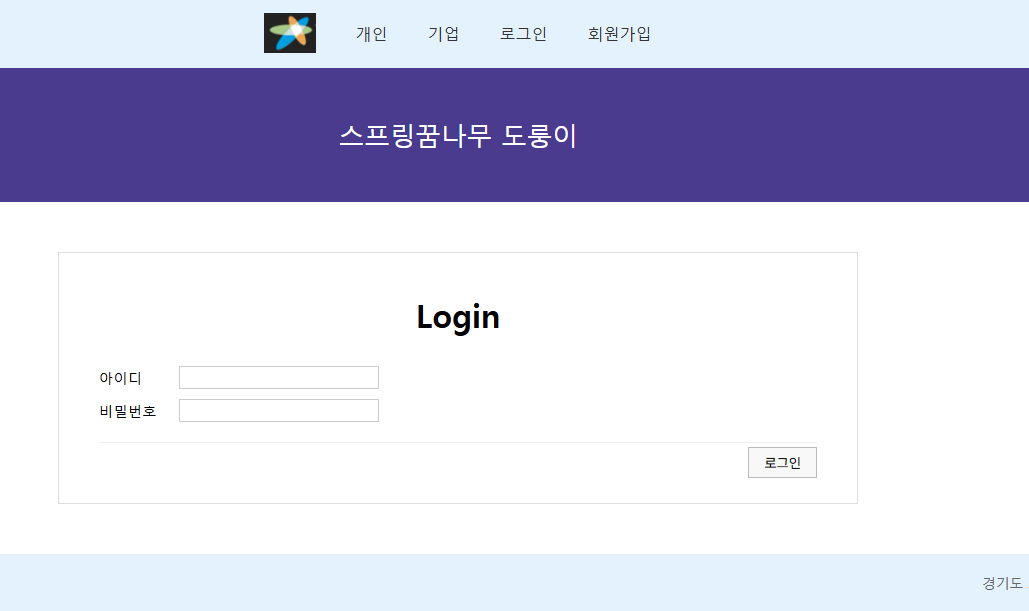
자바스크립트 예시
script안에 자바스크립트로 실행한다.
<!doctype html>
<html lang="en">
  <head>
    <meta charset="UTF-8" />
    <meta name="viewport" content="width=device-width, initial-scale=1.0" />
    <title>Document</title>
  </head>
  <body>
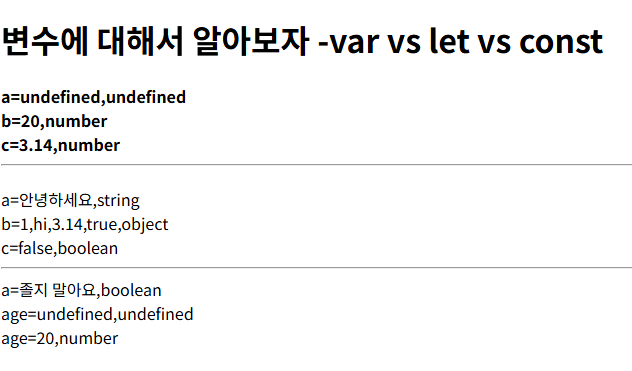
    <h1>변수에 대해서 알아보자 -var vs let vs const</h1>
    <script>
      // 변수선언  선언할 때 var 생략도 가능
      // var 변수 이름;
      // var 변수이름 = 값;

      var a;
      var b = 20;
      c = 3.14;
      document.write("<h4>");
      document.write("a=" + a + "," + (typeof (a)) + "<br>");
      document.write("b=" + b + "," + (typeof (b)) + "<br>");
      document.write("c=" + c + "," + (typeof (c)) + "<hr>");


        document.write("</h4>");
      //값 변경
        a="안녕하세요";
        b= new Array(1, "hi", 3.14, true);
        c=false;


        document.write("a=" + a + "," + (typeof (a)) + "<br>");
        document.write("b=" + b + "," + (typeof (b)) + "<br>");
        document.write("c=" + c + "," + (typeof (c)) + "<hr>");

        var a="졸지 말아요";
        document.write("a=" + a + "," + (typeof (c)) + "<br>");
        document.write("age=" + age + "," + (typeof(age))+"<br>");
        document.write("</h4>");

        var age=20;

        document.write("</h4>");

        document.write("age=" + age + "," + (typeof(age))+"<br>");


        function test(){
            alert("test() 호출됨......1")
        }

          function test(){
            alert("test() 호출됨......1")
        }

    </script>
  </body>
</html>'Dev > React' 카테고리의 다른 글
| 자바스크립트 prmot 입력창 값 (0) | 2026.03.26 |
|---|---|
| 자바스크립트 var 변수 (0) | 2026.03.26 |
| Display - flex , grid (0) | 2026.03.25 |
| CSS margnin padding ,position (0) | 2026.03.25 |
| 프론트엔드#2-CSS실습 기본적인 style적용 (0) | 2026.03.24 |