
internal와 external로 구분하여 css html 안에서(internal) / 밖으로 별도 분리(external) 적용해보았다.
<!DOCTYPE html>
<html lang="en">
<head>
    <meta charset="UTF-8">
    <meta name="viewport" content="width=device-width, initial-scale=1.0">
    <title>Document</title>
    <style>
 /*여기는 css영역 selector{property:value;...}
css 문법
   1. 태그에 적용하기
 */
 h1{color: blue;background-color: yellow;}
 h1,h2{text-decoration: underline;}
 /* 태그를 여러개쓰고싶을때 ,를쓰면된다 */

 /* 2.id에 적용하기 */
 #a{font-style: italic; border: 3px double blue}
 #b{width: 500px; height: 150px;}
/* 순서 상관x 스타일 컬러 와이드 공백만 넣으면 한번에 처리할 수 있다 */

 /* 3. class에 적용하기 */
 .a{width: 300px; height: 300px; background-color: aqua;}
 .b{border-radius: 150px; opacity: 0.5;}
 /* opacity 는 불투명도  */

/* 4. 자손(공백), 자식들(>) */
/* div p{background-color: blueviolet;} */

/* +는 형제노드를 찾는다. */
/* div+p{background-color: blueviolet;} */


div~p{background-color: blueviolet;}

/* 6.속성으로찾기 */
form{width: 400px; height: 250px;border: double red 3px;}
input{border: 1px gray solid;}
[type]{color: blue;}
input[type=password] {font-size: 25px;}


/* $는 속성값중에 d로 끝나는 */
input[name$=d]{font-style: italic;}
/* name 이 d로 끝나는거다 */

/* 요소의 특별한 상태를 나타내는 가상클래스 */
table{width: 400px; height: 400px;
border: 1px black solid;  border-collapse: collapse;}

td{
    border: 1px solid gray;
    text-align: center;
    vertical-align: middle;
}

table tr:nth-child(2n) {
    background-color: aquamarine;
}
table tr:nth-child(1){
font-weight: bold; color: red;
}
table tr td:first-child {
    width: 100px; color: blue;


}

</style>
</head>
<body>
    <!-- internal 방식은 현재 문서의 style태그를 열어서 적용하는 방식 -->

     <h1 id="a" class="a b">CSS 적용하기 2</h1>
      <h2 class="a">CSS 적용하기 3</h2>
      <h1 id="b">CSS 적용하기 3</h1>
      <hr>
      <h1>The Descendant ( ) Combinator</h1>

<div>
  <h2>Donald Duck</h2>
  <p>Donald Duck lives in Duckburg.</p>
</div>
<!-- 자식 -->
<div>
  <span><p>I will be styled.</p></span>
  <p>I will be styled.</p>
</div>

<p>Donald Duck's best friend is Mickey.1</p>
<p>Donald Duck's best friend is Mickey.2</p>
<p>Donald Duck's best friend is Mickey.3</p>

<hr>
<form action="">
아이디 <input type="text" name="id"><br>
이름<input type="text" name="name"><br>
비밀번호<input type="password" name="pwd"><br>

</form>

<hr>

<table>
    <tbody>
        <tr>
            <td>1</td>
            <td>2</td>
            <td>3</td>
        </tr>
        <tr>
            <td>1</td>
            <td>2</td>
            <td>3</td>
        </tr>
        <tr>
            <td>1</td>
            <td>2</td>
            <td>3</td>
        </tr>
        <tr>
            <td>1</td>
            <td>2</td>
            <td>3</td>
        </tr>
        <tr>
            <td>1</td>
            <td>2</td>
            <td>3</td>
        </tr>
        <tr>
            <td>1</td>
            <td>2</td>
            <td>3</td>
        </tr>
        <tr>
            <td>1</td>
            <td>2</td>
            <td>3</td>
        </tr>
        <tr>
            <td>1</td>
            <td>2</td>
            <td>3</td>
        </tr>
        <tr>
            <td>1</td>
            <td>2</td>
            <td>3</td>
        </tr>
        <tr>
            <td>1</td>
            <td>2</td>
            <td>3</td>
        </tr>
    </tbody>
</table>


</body>
</html>
table>tbody>tr*10>td{$}*3 이렇게 테이블을 생성하는 약어를 쓰면 10행3열 테이블을 만들어준다.

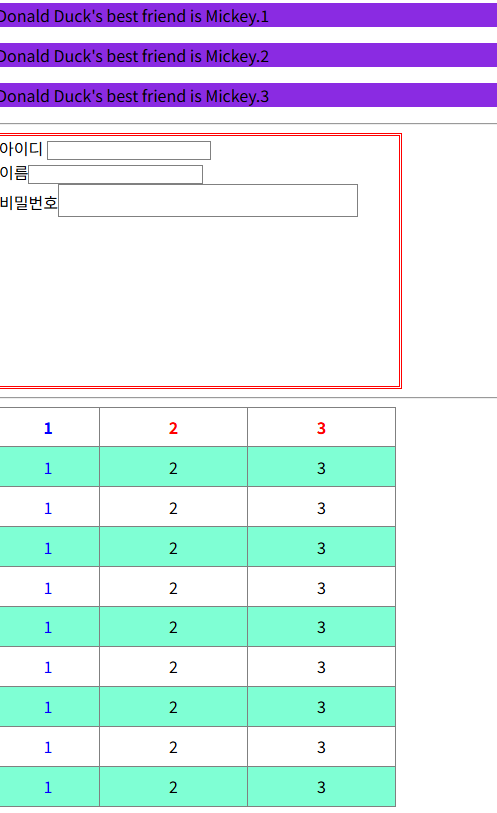
external로 분리해서 css파일을 만들어서 적용하는게 수정하기 쉽다.
  <!-- 외부 css연결 -->
  <link rel="stylesheet" href="./css/basic.css">
  <style>
</style>
h1{color: blue;background-color: yellow;}
h1,h2{text-decoration: underline;}
/* 태그를 여러개쓰고싶을때 ,를쓰면된다 */
/* 2.id에 적용하기 */
#a{font-style: italic; border: 3px double blue}
#b{width: 500px; height: 150px;}
/* 순서 상관x 스타일 컬러 와이드 공백만 넣으면 한번에 처리할 수 있다 */
/* 3. class에 적용하기 */
.a{width: 300px; height: 300px; background-color: aqua;}
.b{border-radius: 150px; opacity: 0.5;}
/* opacity 는 불투명도 */
/* 4. 자손(공백), 자식들(>) */
/* div p{background-color: blueviolet;} */
/* +는 형제노드를 찾는다. */
/* div+p{background-color: blueviolet;} */
div~p{background-color: blueviolet;}
/* 6.속성으로찾기 */
form{width: 400px; height: 250px;border: double red 3px;}
input{border: 1px gray solid;}
[type]{color: blue;}
input[type=password] {font-size: 25px;}
/* $는 속성값중에 d로 끝나는 */
input[name$=d]{font-style: italic;}
/* name 이 d로 끝나는거다 */
/* 요소의 특별한 상태를 나타내는 가상클래스 */
table{width: 400px; height: 400px;
border: 1px black solid; border-collapse: collapse;}
td{
border: 1px solid gray;
text-align: center;
vertical-align: middle;
}
table tr:nth-child(2n) {
background-color: aquamarine;
}
table tr:nth-child(1){
font-weight: bold; color: red;
}
table tr td:first-child {
width: 100px; color: blue;
}결과는 동일하게 나온다.
'Dev > React' 카테고리의 다른 글
| 자바스크립트 var 변수 (0) | 2026.03.26 |
|---|---|
| [JS] 등록form 이메일 유효성 체크 및 JavaScript 적용 예제 (0) | 2026.03.26 |
| Display - flex , grid (0) | 2026.03.25 |
| CSS margnin padding ,position (0) | 2026.03.25 |
| 프론트엔드 - form 예시 (0) | 2026.03.24 |