


가입 form 예시
<!DOCTYPE html>
<html lang="en">
  <head>
    <meta charset="UTF-8" />
    <meta name="viewport" content="width=device-width, initial-scale=1.0" />
    <title>Document</title>
  </head>
  <body>
    <h1>Register</h1>
    <form action="" method="post" novalidate="novalidate">
    <div>
      <label for="name">이름</label>
      <input type="name" id="name" name="name" required placeholder="이름은 필수입니다."/>
    </div>

    <div>
       <label for="email">이메일</label>
      <input type="email" id="email" name="email" required>
    </div>
    <div>
   <label for="phone">연락처</label>
      <input type="text" id="phone" name="phone">
    </div>
     <div>
   <label for="password">비밀번호</label>
      <input type="password" id="password" name="password">
    </div>
     <div>
   <label for="password">비밀번호확인</label>
      <input type="password2" id="password2" name="password2">
    </div>
    <hr />
    <button type="submint">회원가입</button>
    </form>
  </body>
</html>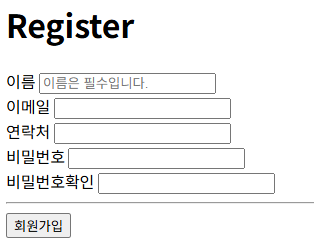
등록 form 예시
<!DOCTYPE html>
<html lang="en">
<head>
    <meta charset="UTF-8">
    <meta name="viewport" content="width=device-width, initial-scale=1.0">
    <title>Document</title>
</head>
<body>
    <h2>HTML5에 추가된 폼요소 속성들 </h2>
    <form action="" novalidate >
       <input type="date" min="2025-07-28" max="2025-10-15" ><br/>
       <input type="text" placeholder="이름입력" required> <br>
       <input type="email" required placeholder="이메일입력" ><br>
       <input type="number" name="age">

       <!-- 화면에 나타나지 않지만 개발자입장에서 어떤 정보를 서버에 전송하고싶다.-->
        <input type="hidden" name="state" value="yes">
        <input type="hidden" name="info" value="테스중...">
        <br>
        <!-- 반드시 form속성으로  method="post"  enctype="multipart/form-data" 필수 -->
        <input type="file" name="file"><br>

        <!-- 전송기능 -->
        <input type="image" src="img/cat.gif">

       <button>등록</button>
    </form>
</body>
</html>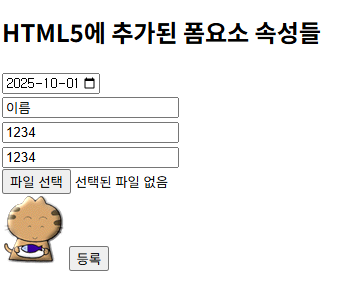
'Dev > React' 카테고리의 다른 글
| 자바스크립트 var 변수 (0) | 2026.03.26 |
|---|---|
| [JS] 등록form 이메일 유효성 체크 및 JavaScript 적용 예제 (0) | 2026.03.26 |
| Display - flex , grid (0) | 2026.03.25 |
| CSS margnin padding ,position (0) | 2026.03.25 |
| 프론트엔드#2-CSS실습 기본적인 style적용 (0) | 2026.03.24 |