
<!DOCTYPE html>
<html lang="en">
<head>
    <meta charset="UTF-8">
    <meta name="viewport" content="width=device-width, initial-scale=1.0">
    <title>Document</title>
</head>
<body>
    <h1>연산자를 알아보자</h1>

    <script>
let i = 10;
let j = "10";

document.write("<h3>");
document.write("i="+ i +", type="+(typeof i)+"<br>");

document.write(`j=${j}, type=${typeof j}<br>`);

document.write(`${i}==${j} => ${i==j}<br>`);

//형변환
let data1 = "100";
let data2 = "100a";
let data3 = "a100";
console.log(data1 +10);
console.log(data1 *10);
console.log(parseInt(data1) +10);
console.log(Number(data1) +10);

console.log("------------------")
//console.log(parseInt(date2));
//console.log(Number(date2));


console.log("------------------")
//console.log(parseInt(date3));
//console.log(Number(date3));


console.log("------------------")
if(isNaN(data1)){
    console.log("숫자가 아니다.")
}else{
    console.log("숫자이다");
}

//window 객체 안에 주요함수
//1.메세지 출력
//alert("메세지를 출력합니다.");

//2.의사 물어볼때
//let result = confirm("삭제 하실래요?")
//consloe.log("result"+ result);
//3.입력값을 받을 때

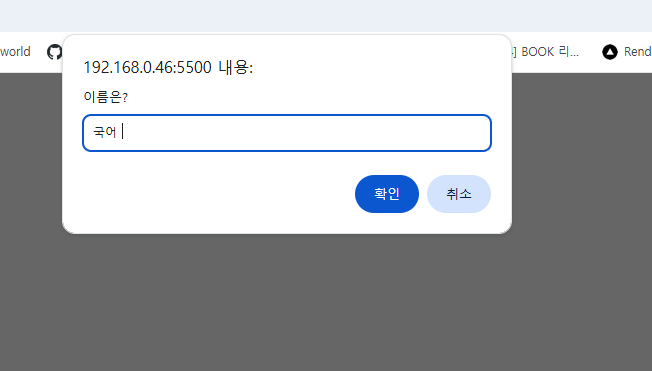
let name = prompt("이름은?", "수학");
console.log("name=" +name);

document.write("</h3>");


    </script>
</body>
</html>
Let 사용방법


<!doctype html>
<html lang="en">
  <head>
    <meta charset="UTF-8" />
    <meta name="viewport" content="width=device-width, initial-scale=1.0" />
    <title>Document</title>
  </head>
  <body>
    <h1>변수에 대해서 알아보자 -var vs let vs const</h1>
    <script>
      // 변수선언  선언할 때 var 생략도 가능
      // var 변수 이름;
      // var 변수이름 = 값;

      var a;
      var b = 20;
      c = 3.14;
      document.write("<h4>");
      document.write("a=" + a + "," + (typeof (a)) + "<br>");
      document.write("b=" + b + "," + (typeof (b)) + "<br>");
      document.write("c=" + c + "," + (typeof (c)) + "<hr>");


        document.write("</h4>");
      //값 변경
        a="안녕하세요";
        b= new Array(1, "hi", 3.14, true);
        c=false;


        document.write("a=" + a + "," + (typeof (a)) + "<br>");
        document.write("b=" + b + "," + (typeof (b)) + "<br>");
        document.write("c=" + c + "," + (typeof (c)) + "<hr>");

        var a="졸지 말아요";
        document.write("a=" + a + "," + (typeof (a)) + "<br>");
        document.write("age=" + age + "," + (typeof(age))+"<br>");
        document.write("</h4>");

        var age=20;

        document.write("</h4>");

        document.write("age=" + age + "," + (typeof(age))+"<br>");

        // 함수에 대해서 알아보사 선언적 함수
        function test(){
            alert("test() 호출됨......1")
        }

          function test(){
            alert("test() 호출됨......1")
        }


        //자바스크림트에서의 변수 scope에 대해서 알아보자
         i = 10; // 전역 변수

function test2() {
  let i = 5;  // test2 함수 내 지역 변수
  let j = 20; // test2 함수 내 지역 변수
  k = 50;     // 전역 변수 (var 선언이 없으므로 전역 객체에 등록됨)

  console.log("--- test2 실행 ---");
  console.log("i=" + i);           // 지역 변수 5
  console.log("this.i=" + this.i); // 전역 변수 10 (브라우저 환경 기준)
  console.log("j=" + j);           // 20
  console.log("k=" + k);           // 50
}

function test3() {
  console.log("--- test3 실행 ---");
  console.log("i=" + i);           // 전역 변수 10 (test2의 지역변수 i와는 무관)
  console.log("this.i=" + this.i); // 전역 변수 10
  console.log("k=" + k);           // test2에서 생성된 전역 변수 50

  // 1. 반복문 수정: index 변수를 사용하도록 조건식 수정 (i<=10으로 두면 무한루프 위험)
  // 전: index를 출력하기 위해 반복문 밖에서도 볼 수 있게 var로 유지
  for (var index = 0; index <= 10; index++) {
    // 반복문 수행
  }

  console.log("전: index=" + index); // var는 함수 스코프이므로 출력 가능 (결과: 11)

  // 2. 블록 스코프 테스트
{
    let nickName = "김도룽";
    console.log("블록 안: " + nickName); // ✅ 블록 안에서는 접근 가능
  }

  // 자바스크립트의 var 변수의 scope은 함수 단위이므로 {} 블록 밖에서도 접근 가능
  // console.log("후: index=" + index);
  // console.log("후: nickName=" + nickName);
}

test2();
test3();
//선언적 함수 스타일이 아닌 표현식으로 선언하면 중복되는 함수이름을 사용할 수 없다.
   let test04 = function (){
    alert("출력되나요?");

   }

   test04();

const test05 = function(){
  console.log("test05 call");
}

test05();

let addr;
addr ="분당";

const message = "뭐먹지?";

message="값변경되니?";

const person = {
  name : "혜진",
  age: 20,

}

console.log(person.name);
console.log(person.age);
person.name="신신";
// let의 선언한 변수를 또 선언할수 있는지? - x
//     선언전에 사용할수 있는지? - x
//        Uncaught ReferenceError: Cannot access 'd' before initialization
//        let 변수도 호이스팅이 되지만 값을 할당하기전에는 사용불가하하다.
//        TDZ(Temporal Dead Zone) 이라고 한다. - 변수의 선언과 변수의 초기화 사이의 변수에 접근 할수 없는 지점
//        즉, 초기화되지 않은 변수가 있는 곳을 Temporal Dead Zone 이라고 한다.
//      let 변수의 scope 블럭레벨 scope이 된다!!
//      함수를 선언할때 선언적 함수가 아닌 함수표현식으로 작성하게되면
//      동일한 이름의 함수를 단 한개 만 만들수 있다!
//      함수표현식으로 작성한 함수는 선언전에 호출 할 수없다!!
//      const는 상수로 반드시 선언과 동시에 값을 할당해야하고 한번  초기화 되고나면
//      값변경이 불가하다. - const는 주로 함수 , 객체들을 const에 저장을 한다.


   </script>
  </body>
</html>
'Dev > React' 카테고리의 다른 글
| [React] 리액트 개요, 환경설정 | Nodejs 설치 | VS코드 확장플러그인 추천 (0) | 2026.04.02 |
|---|---|
| 자바스크립트 함수선언방식 | 함수선언방식, 함수표현식, 화살표함수, function생성자 함수 , window객체 주요함수 (0) | 2026.03.30 |
| 자바스크립트 var 변수 (0) | 2026.03.26 |
| [JS] 등록form 이메일 유효성 체크 및 JavaScript 적용 예제 (0) | 2026.03.26 |
| Display - flex , grid (0) | 2026.03.25 |
